Amonkcus: Integrating a Quirky Display Font into Professional Design Workflows
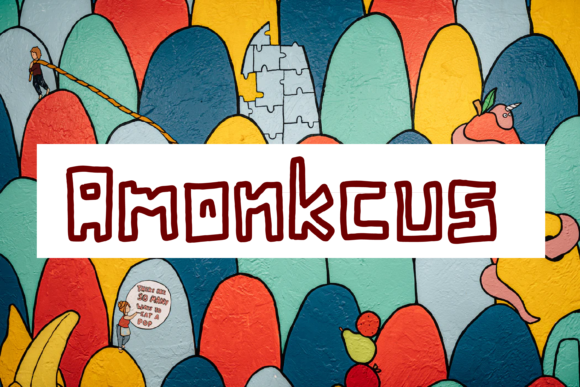
In the landscape of digital typography, finding a typeface that balances distinct character with professional utility is often a challenge. Most designers default to safe, neutral sans-serifs for body text and reserve display fonts for specific, high-impact moments. Amonkcus enters this space not merely as an aesthetic choice, but as a functional tool for creators who need to inject personality without sacrificing readability or structural integrity. As a cool, quirky outlined display font, it serves a niche yet vital role in visual communication, particularly where humor, playfulness, or bold statement-making is required.
For professionals ranging from marketers and entrepreneurs to educators and hobbyists, the integration of a specialized font like Amonkcus requires more than just dragging and dropping text onto a canvas. It demands an understanding of context, hierarchy, and audience perception. This article explores how to effectively incorporate Amonkcus into your creative processes, ensuring that its unique outlined style enhances rather than distracts from your core message.
Understanding the Role of Outlined Display Fonts
Before diving into implementation, it is crucial to understand what makes Amonkcus distinct. Unlike standard fill-typefaces that rely on solid color blocks for legibility, outlined fonts use negative space and stroke weight to define their forms. This characteristic gives them a retro, cartoonish, or sticker-like quality. They are inherently loud. In a design workflow, "loud" is not always bad; it is a strategic decision used to capture attention in crowded visual fields.
Amonkcus fits into the broader category of display typography—fonts designed for large sizes rather than extended reading. Its quirky nature makes it unsuitable for dense paragraphs or fine print, but exceptionally powerful for titles, logos, and short-form copy. When you are planning a project, consider where the "noise" needs to be highest. Is it a book cover? A poster? A brand name for a children’s game? These are the environments where Amonkcus thrives because it commands immediate focus.
Defining Your Use Case Early
The most common mistake when introducing a quirky font into a workflow is applying it indiscriminately. To avoid this, start your process by defining the emotional tone of the project. If you are creating content for a serious financial report, Amonkcus will likely clash with the desired tone of authority and stability. However, if you are designing materials for a creative workshop, a kids' educational app, or a playful social media campaign, the font aligns perfectly with the goal of engagement.
Consider the following scenarios where Amonkcus adds value:
- Cartoon-related designs: The outlined style mimics comic book art and animation cels, making it ideal for storytelling visuals.
- Children’s games: Playful, rounded, and energetic, it resonates with younger audiences who respond to vibrant, approachable imagery.
- Quotes and titles: For impactful one-liners or section headers, the outline allows the text to interact dynamically with background images.
- Brand names: A distinctive logo type can become a memorable asset, provided the font matches the brand's voice.
- Book covers and posters: High-contrast outlined text stands out even at small thumbnail sizes, a critical factor in digital marketplaces.
Integration into the Creative Workflow
Once you have identified that Amonkcus is the right tool for the job, the next phase is technical integration. How does this font interact with other assets? What are the constraints? Addressing these questions early prevents costly revisions later in the production cycle.
Preparation and Asset Management
Efficiency begins with organization. Before opening your design software, ensure you have the correct file formats for Amonkcus. Typically, display fonts come in .OTF or .TTF formats. Verify that the license allows for your intended use, whether that is personal projects, commercial client work, or web embedding. Missteps here can lead to legal complications, which disrupt any workflow.
Furthermore, prepare your working environment. Since Amonkcus is an outlined font, it relies heavily on contrast. Test the font against various background colors and textures during the sketching phase. Does the white outline pop against a dark background? Does the black outline vanish against a busy image? Early testing saves time during the final polish stage.
Pairing with Complementary Typefaces
No font exists in isolation. Amonkcus has a strong personality, so it must be paired carefully to maintain balance. The general rule of thumb in typography is contrast. Because Amonkcus is decorative and display-oriented, pair it with a clean, neutral sans-serif or serif for supporting text.
For example, if you are designing a poster for a children’s event using Amonkcus for the main title, use a simple, highly readable font like Helvetica, Roboto, or Lato for the date, location, and details. This creates a clear visual hierarchy. The eye is drawn to the quirky title first, then guided down to the essential information. Without this pairing strategy, the design can feel chaotic and amateurish, undermining the professionalism of the output.
Practical Implementation Tips
Implementing Amonkcus successfully requires attention to detail regarding spacing, sizing, and styling. Here are practical guidelines to ensure high-quality results.
Kerning and Tracking Adjustments
Outlined fonts often behave differently than filled fonts regarding spacing. The visual weight of the letters is distributed along the edges, which can make tracking (letter-spacing) appear looser or tighter depending on the size. Always check kerning pairs manually. Letters like 'A', 'V', and 'W' may require additional adjustment to prevent awkward gaps between the strokes. Small adjustments here significantly elevate the perceived quality of the design.
Background Interaction
One of the strengths of Amonkcus is its ability to overlay images. However, this introduces a risk: legibility. If the background is too complex, the outline may get lost. To mitigate this:
- Use drop shadows or glows: A subtle shadow behind the outlined text can separate it from the background without obscuring the quirky shape.
- Simplify backgrounds: Blur or darken areas of the background image where the text sits.
- Add a semi-transparent backing: A faint rectangle behind the text can provide contrast while maintaining transparency.
Consistency Across Media
If you are using Amonkcus for a brand identity, consistency is key. Ensure that the font renders correctly across different platforms. Web browsers sometimes struggle with custom outlined fonts, especially if they are rendered as images rather than vector paths. Consider converting your text to outlines (paths) only in the final export stages for print or static graphics. For web use, ensure you have robust fallback fonts defined in your CSS to maintain usability if the custom font fails to load.
Long-Term Value and Quality Control
Using Amonkcus is not just about a single project; it is about building a library of effective design decisions. Over time, you will notice patterns in what works. You might find that Amonkcus performs best in warm color palettes or when paired with hand-drawn illustrations. Documenting these observations helps streamline future projects.
Quality control should also involve user feedback. If you are designing for a specific demographic, such as parents for a children’s product, test the visual appeal with a small sample group. Does the font convey the right level of fun? Is it easy to read? Feedback loops are essential for refining your use of display fonts.
Scalability and Versatility
While Amonkcus is excellent for large displays, remember its limitations. It is not a versatile body text font. By accepting this limitation, you protect the integrity of your designs. Using it sparingly ensures that it retains its impact. When every headline uses a quirky font, none of them stand out. Reserve Amonkcus for the moments that matter most—the hook, the title, the call to action.
Conclusion on Integration
Amonkcus is more than just a pretty face in your font menu. It is a strategic element that, when integrated thoughtfully into your workflow, can elevate cartoons, children’s games, quotes, titles, brand names, book covers, and posters. By understanding its outlined nature, pairing it with neutral companions, and paying close attention to spacing and background interaction, you can harness its quirky beauty effectively.
Whether you are a freelancer crafting a quick social media post or a publisher designing a full book series, treating Amonkcus as a deliberate choice within a broader plan will yield better outcomes. Focus on clarity, contrast, and context. Let the font do the heavy lifting for emotion and attention, while your other design elements handle structure and information. In doing so, you create work that is not only visually striking but also professionally sound.