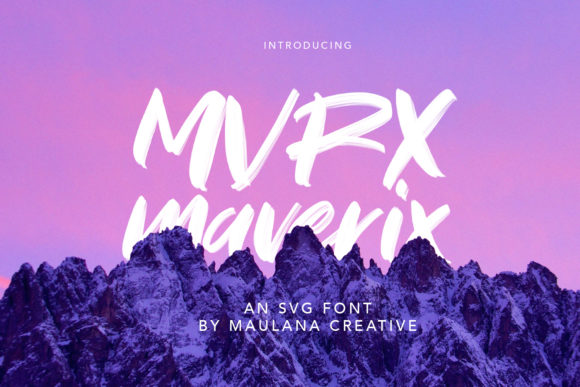
Maverix: Why This Urban Display Font Might Be the Missing Piece in Your Design
Choosing the right typeface is rarely just about aesthetics; it is about communication. You are looking for a font that speaks to your audience, sets the mood, and ensures readability without screaming for attention. Enter Maverix, a cool, relaxed, and urban-styled display font that has been gaining traction among designers who want to inject personality into their work without sacrificing clarity. Whether you are designing for a children’s game, a bold brand identity, or a quirky book cover, Maverix offers a unique blend of approachability and edge.
However, not every designer knows how to wield this tool effectively. Many creators make the mistake of treating all display fonts as interchangeable, leading to designs that feel cluttered, unprofessional, or simply "off." If you are considering adding Maverix to your toolkit, it is crucial to understand its specific character, its ideal use cases, and the common pitfalls that can undermine your design efforts. Let’s break down what makes Maverix special and how to use it wisely.
Understanding the Maverix Aesthetic
Maverix is not a standard serif or sans-serif font. It falls squarely into the display category, meaning it is designed to be used at larger sizes where its stylistic nuances can shine. The font carries a distinct urban vibe—think street art meets modern minimalism. Its relaxed nature makes it incredibly versatile for projects that need to feel friendly yet contemporary.
When you look at the letterforms, you will notice they are crafted to catch the eye. They are not rigid or overly formal. Instead, they possess a certain fluidity that works exceptionally well for:
- Cartoon-related designs: The playful curves align perfectly with animated characters or comic-style illustrations.
- Children’s games and apps: The relaxed style invites interaction and feels less intimidating than traditional block letters.
- Brand names and logos: For startups aiming for a youthful, energetic, or creative image, Maverix provides an instant personality boost.
- Posters and event flyers: When you need to grab attention quickly, the urban styling stands out against busy backgrounds.
The key takeaway here is that Maverix is a mood setter. It tells the viewer before they even read the text that the content is fun, modern, and accessible. But this strength is also its greatest vulnerability if misused.
The Readability Trap
One of the most common mistakes designers make with display fonts like Maverix is overusing them for body text. Because Maverix is styled for impact, it lacks the subtle refinements that make long-form reading comfortable. Using it for paragraphs, legal disclaimers, or detailed instructions will fatigue your reader’s eyes and reduce comprehension.
If you find yourself wanting to use Maverix for more than just headlines, titles, or short quotes, pause and reconsider. Reserve this font for moments where you want to create a visual anchor. For supporting text, pair it with a clean, neutral sans-serif or a highly legible serif. This contrast creates a hierarchy that guides the reader’s eye naturally from the catchy headline to the informative details.
Common Missteps in Implementation
Even experienced designers can stumble when integrating a distinctive font like Maverix into a broader design system. Here are a few areas where things often go wrong, and how you can correct them.
Ignoring Context and Audience
Maverix has an urban, slightly edgy feel. While this is great for a skate shop logo or a music festival poster, it might clash violently with a corporate financial report or a medical clinic brochure. The mismatch between font personality and brand message can confuse customers and dilute trust.
Better Approach: Before downloading or purchasing Maverix, ask yourself: Does this font reflect my brand’s voice? If your brand is serious, authoritative, or traditional, Maverix may send the wrong signal. If your brand is innovative, playful, or youth-oriented, it is likely a perfect fit. Always test the font in context. Place it next to your existing brand elements to see if they harmonize or fight each other.
Poor Pairing Choices
A frequent error is pairing a complex display font with another equally busy or decorative font. This results in visual noise where neither typeface gets the chance to breathe. You might be tempted to pair Maverix with another handwritten script or a heavy blackletter font, assuming they share a similar "vibe."
Better Approach: Simplicity is your friend. Pair Maverix with fonts that have high legibility and minimal decoration. Think of fonts like Helvetica, Roboto, or Open Sans for digital interfaces, or Georgia for print. The goal is to let Maverix be the star while the supporting font does the heavy lifting of information delivery. This balance ensures that your design looks professional rather than chaotic.
Neglecting Spacing and Kerning
Display fonts require more generous spacing than body text. Because Maverix has distinct shapes and potential overlapping features, tight letter-spacing (kerning) can cause the letters to merge, making words illegible. Conversely, too much space can break the word apart visually, losing the impact of the display style.
Better Approach: Always adjust tracking and kerning manually when using Maverix at large sizes. Zoom in to 100% or more to check the gaps between letters. Look for optical imbalances—sometimes two letters look evenly spaced but actually appear uneven to the human eye. Don’t rely solely on automatic settings; your judgment as a designer is superior to software algorithms in these nuanced situations.
Evaluating Licensing and Technical Details
Before you integrate Maverix into your project, there are practical administrative steps that many overlook. Fonts are intellectual property, and using them incorrectly can lead to legal issues or unexpected costs.
- Check the License Type: Ensure you understand whether the license covers personal use, commercial use, web embedding, or app integration. Some licenses are restrictive regarding the number of users or devices.
- File Formats: Verify that the package includes the formats you need. For web design, you will likely need WOFF or WOFF2 files. For print, OTF or TTF files are standard. Having the wrong format can cause compatibility headaches during development.
- Weight Variations: Does Maverix come in multiple weights (Light, Regular, Bold)? Having options allows you to create better typographic hierarchy within your design. If only one weight is available, your flexibility is severely limited.
Final Thoughts on Making the Right Choice
Maverix is a powerful asset for any designer’s arsenal, particularly for those working in creative, entertainment, or lifestyle sectors. Its cool, relaxed, and urban style adds a layer of sophistication and fun that standard fonts often lack. However, its effectiveness depends entirely on how thoughtfully you apply it.
By avoiding the trap of overuse, choosing complementary pairings, respecting spacing, and verifying licensing, you can leverage Maverix to create designs that are not only beautiful but also effective. Remember, the best typography is invisible—it supports the message without distracting from it. When used correctly, Maverix does exactly that, allowing your creativity to shine through while keeping your audience engaged and informed.
Take the time to experiment. Create mockups. Test different backgrounds and colors. See how Maverix interacts with images and other graphic elements. With a little patience and attention to detail, you will find that this font can elevate your projects from good to exceptional.